 Skip to content
Kyocera TASKalfa MA3500ci lease
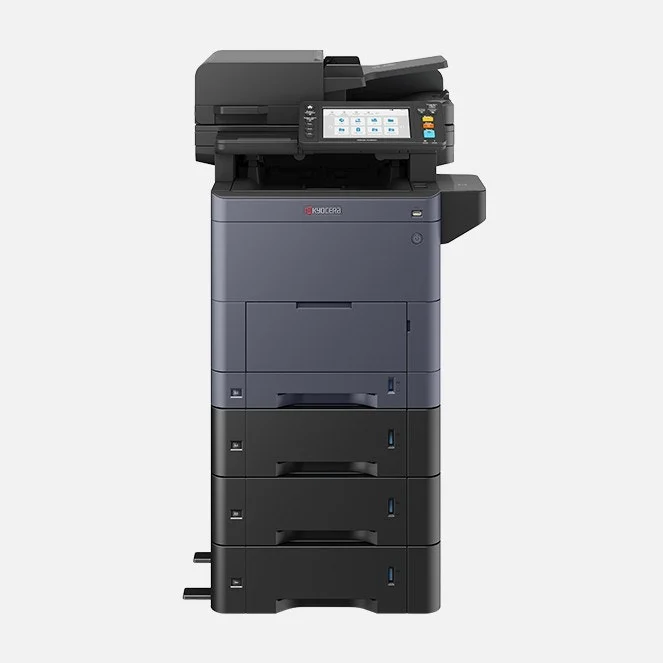
A free standing A4 colour printer, copier and scanner for small and medium teams, quoted with extra paper drawers and a stand so it sits on the floor.
From GDS, an authorised Kyocera partner since 2010, with 150+ five star Google reviews.
Is it right for your office?
It suits a small or medium team that prints mostly on A4 paper, in colour and in black and white.

A good fit when
- Your team shares one printer for everyday A4 work.
- You scan a lot of paperwork to email or shared folders.
- You want colour without giving up a big corner of the office.
Look elsewhere when
- You print on A3 paper, so see our A3 printer lease plans instead.
- Several large teams print all day, where a faster machine keeps the queue short.
- You need a plotter or a large format printer, which GDS does not lease.
How much does your team print?
Move the slider to your rough monthly page count and see what that means on this machine.
About 4 minutesof printing a day, at 35 pages a minute over 21 working days
About 5.7 monthsfrom each black toner, at Kyocera’s 5% test cover
Your quote is priced on the pages you print, so a rough figure is enough.
MA3500ci specifications
Pull out a drawer for the figures you need when you size a printer for an office.
Printing and paper
Speed, paper sizes and how much paper it holds
Printing and paper
Speed, paper sizes and how much paper it holds- How GDS supplies it
- Free standing, with extra paper drawers and a stand
- What it does
- Prints, copies and scans in colour and black and white
- Speed
- Up to 35 A4 pages a minute, colour or black and white
- Largest paper
- A4, plus the slightly longer Legal size and custom sizes up to 216 x 356 mm
- Paper trays
- 250 sheet drawer and 100 sheet side tray, growing to 2,000 sheets with extra drawers
- First page out
- About 5.7 seconds in black and white and 7 seconds in colour
- Warm up
- About 26 seconds
- Double sided printing
- Built in
Scanning and screen
Document feeder, scan speed and touch screen
Scanning and screen
Document feeder, scan speed and touch screen- Document feeder
- 100 sheets, scanning both sides in one pass
- Scan speed
- Up to 100 page sides a minute in black and white and 80 in colour
- Screen
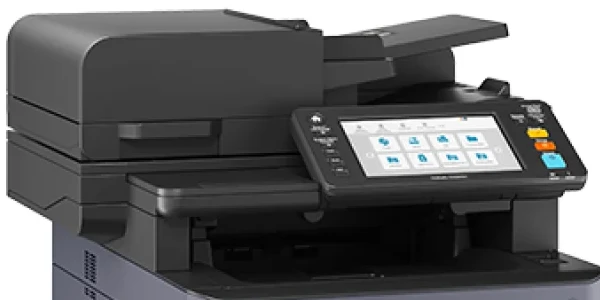
- 7 inch colour touch screen
Phones, network and add ons
Printing from phones, Wi‑Fi and optional extras
Phones, network and add ons
Printing from phones, Wi‑Fi and optional extras- Phone and laptop printing
- iPhones and Macs through AirPrint, Android through Mopria, the Kyocera Mobile Print app, and Microsoft Universal Print for Windows
- Network
- Plugs into your office network by cable (Gigabit Ethernet) or USB, with wireless as an add on
- Add ons
- PF-5150 paper feeders, a 1244/10 cabinet, wireless networking (IB-37 or IB-51), a card reader so staff log in with a card, and SSD storage of 64 GB, 256 GB or 512 GB
Toner, size and weight
Pages per toner and the space it needs
Toner, size and weight
Pages per toner and the space it needs- Toner yield
- About 17,000 pages from each black toner and 10,000 from each colour toner, based on lightly printed pages (5% cover)
- Size and weight
- 480 mm wide, 577.5 mm deep and 571.5 mm high for the printer on its own, about 39 kg, and taller once it sits on its drawers and stand
Toner yields are Kyocera’s test figures, so real pages vary with what you print.
Figures come from Kyocera Australia’s TASKalfa MA3500ci datasheet.
Want every figure?
Download the Kyocera MA3500ci datasheet (PDF).
What a GDS lease looks like
A single agreement with a set monthly payment, and an end date you know from the first day.
- Set monthly paymentKyocera machines lease from $160 a month (plus GST), and your written quote sets out the full monthly amount for your term and how much you print.
- Terms of 36 to 60 monthsYou choose the length that suits your budget.
- No auto renewalWhen the term finishes, you choose to keep the machine on a payment or hand it back.
- Print tracking if you want itGDS supplies PaperCut, which shows who prints what.
- Wherever you areGDS services businesses all over Australia.

Not ready for a quote yet?
MA3500ci questions
Straight answers on paper sizes, phones, lease terms and what you pay now.
Can the TASKalfa MA3500ci print on A3 paper?
No, its largest paper is A4, or the slightly longer Legal size.
If you need A3, an A3 model is the better fit.
How fast does it print?
Up to 35 A4 pages a minute, in colour or in black and white.
Can we pay monthly?
Yes.
A GDS lease is one set monthly payment over a term of 36 to 60 months.
Your written quote shows the full monthly amount before you sign.
Can GDS check what I pay now?
Yes.
Send a recent printer invoice through compare my invoice and GDS checks it against today’s lease options.
Can staff print from a phone?
Yes, it works with the Kyocera Mobile Print app, AirPrint, Mopria and Microsoft Universal Print.
How long is the lease?
You pick a term between 36 and 60 months, and it will not roll over by itself.
What can be added to the MA3500ci?
Extra PF-5150 paper drawers (up to 2,000 sheets in total), a cabinet stand, wireless networking, a card reader for staff log in, and SSD storage.
Tell us what you need and the quote includes it.
Where can GDS supply it?
GDS supplies businesses all over Australia, so ask for a quote wherever your office is.
Can I buy one instead of leasing?
Yes, GDS also sells Kyocera printers outright.
See buying a Kyocera printer for how that works.
Tell us roughly how many pages your team prints each month, and GDS prices the MA3500ci to suit.