Kyocera Printer and Scanner Setups for A4 and A3 Office Scanning
Video Testimonials
Kyocera Printer and Scanner Setups for A4 and A3 Office Scanning

What a Kyocera Printer and Scanner Setup Actually Does

On a multifunction there is no separate scanner.

It is the same box as the printer.

Some models are A4 only.

Others take a full A3 sheet on the glass.

The range name will not tell you which, because both ECOSYS and TASKalfa span both sizes.

Scanning goes to email, to a network folder, or to cloud storage such as Google Drive or Dropbox, and it is set up when the machine is installed.

Get a Quote Now and take the first step toward streamlined success.

How the document workflow actually runs

kyocera printer and scanner

Kyocera’s innovative machines boast a streamlined document workflow system, offering a smooth and cost effective way to manage paperwork.

Experience the power of a centralised database with Kyocera, ensuring crucial information is just a click away.

Ready to witness smooth productivity?

Contact us now and optimise your workflow effortlessly.

Say Goodbye to Paper Waste and Outdated Processes

Kyocera copiers don’t just promise efficiency; they deliver lasting impacts on both cost savings and productivity improvement.

Advanced features, including duplex scanning, not only reduce costs associated with duplication projects but also provide real time monitoring capabilities.

Stay informed about what’s happening behind the scenes, giving you peace of mind.

Ask for a trial on your own paperwork

Ready to transform your workflow with Kyocera?

Take the first step by claiming your free trial now.

Experience firsthand how our machines can enhance efficiency and cut costs.

See how our machines can enhance efficiency and cut costs.

Get Your Quote Now.

Who set these up before

Meet Cyrus Dickie, a sixteen year industry veteran leading Global Document Solutions, specialising in optimising printing with Kyocera products.

Committed to exceptional customer service, Cyrus dedicates himself to helping businesses maximise their productivity.

Harness Expertise: Contact Cyrus for Kyocera Solutions.

Matching the machine to the office

Cyrus’s focus on efficiency and cost savings ensures that your printing solutions align with your specific needs.

Whether you’re a small business or a large enterprise, his expertise guides you towards the right Kyocera solution for your printing requirements.

Ready to Elevate Your Business?

Ready to boost your business’s productivity with Kyocera printers and scanners?

Tell Cyrus your monthly page count and he will match a Kyocera printer and scanner to it, on one monthly figure.

Duplex scanning and remote monitoring

Kyocera Printer and Scanner Setups for A4 and A3 Office Scanning

Taking office efficiency to the next level, Kyocera copiers offer advanced features such as duplex scanning and real time monitoring.

Ideal for companies aiming to eliminate paper clutter and reduce labour costs, these machines provide valuable data driven insights into your operations’ performance.

Ready to revolutionise your office with Kyocera’s advanced solutions?

Explore the smooth integration of duplex scanning and real time monitoring.

Revolutionise Efficiency: Contact Us for Your Kyocera Solution.

Increased Efficiency and User Friendly Design

Kyocera copiers provide an intuitive and straightforward user experience.

Whether you’re a tech novice or an expert, Kyocera’s are designed to offer superior performance with minimal effort.

The easy to use interface ensures quick mastery, eliminating the need for long and tedious training sessions.

Kyocera copiers are quick to learn.

From intuitive designs to user friendly interfaces, the panel stays the same as you move up a size.

Get in touch and enhance your workflow today

Enhance Workflow Efficiency with Kyocera Copiers’ Streamlined Features

Kyocera copiers are the perfect solution for businesses looking to save time and money by streamlining their document workflow.

With user friendly document processing capabilities, these machines simplify your workflow, reduce costs, and offer real time monitoring capabilities to ensure optimal operation.

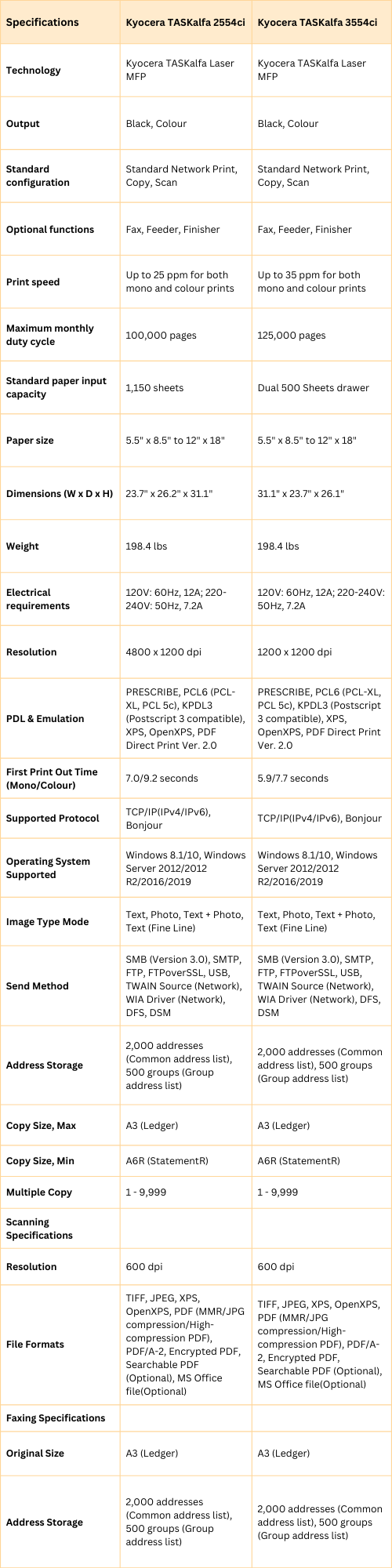
Where the TASKalfa 2554ci and 3554ci fit

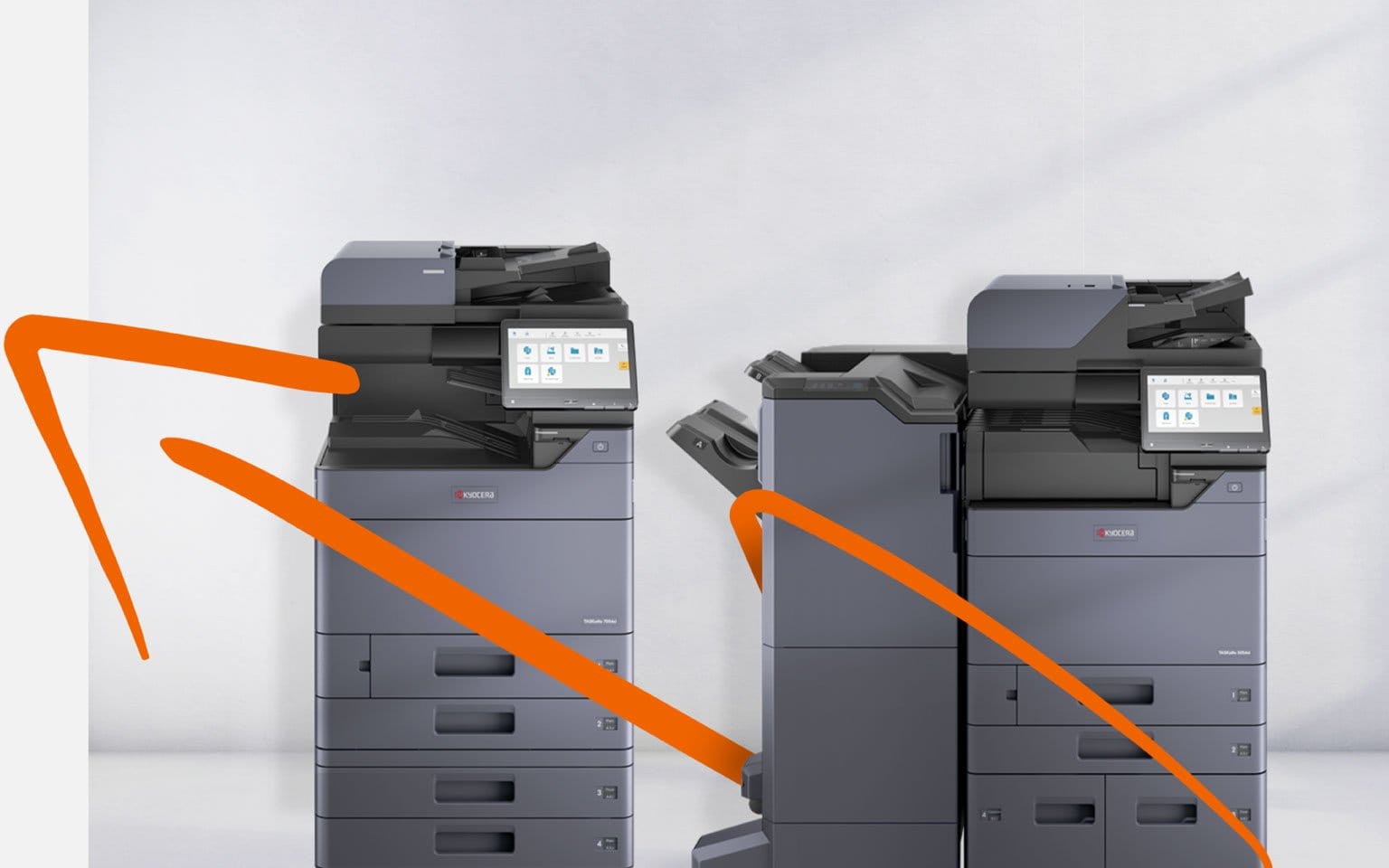
The Kyocera TASKalfa 2554ci and 3554ci stand as solid solutions for multifunctional printing needs in dynamic work environments.

Streamline your business operations for increased productivity and efficiency.

Contact our dedicated team for a customised lease quote and discover how Kyocera can enhance your printing operations.

The 2554ci and the 3554ci, side by side

In the dynamic world of modern workplaces, Kyocera presents two cutting edge solutions, the Kyocera Taskalfa 2554ci and Taskalfa 3554ci.

These colour multifunction printers redefine efficiency and innovation, precision engineered to thrive in dynamic work environments.

Kyocera Printer and Scanner Setups for A4 and A3 Office Scanning

Born from Kyocera’s legacy of excellence, these printers go beyond mere machines; they shape how businesses operate.

Here are the technical details, and the features that earn these machines their place in a busy office.

Boost your productivity today, Get a personalised quote now.

Efficient Duplex Scanning with Taskalfa 3554ci and 2554ci Printers

The TASKalfa 3554ci and 2554ci offer high speed duplex scanning through their document processors, scanning both sides of double sided documents simultaneously.

With features like the DP 7160/7170 document processor, achieving scanning speeds of 200 pages per minute in both full colour and monochrome scanning is a reality.

Explore the benefits of high speed duplex scanning and its potential to revolutionise your document management.

Ready to boost your document processing efficiency?

Get a lease quote or contact us to learn more.

Get your set monthly price

Tell us your monthly page count and we send back one written figure, from $160 a month (plus GST).

Toner, parts, servicing and call outs all sit inside it.

The only thing you ever buy on top is paper.

    We only use your details to prepare and follow up your quote.

    They are never sold or shared for marketing.

    Read our privacy policy.


    Obligation free quote

    No lock in contracts

    $0 upfront, one all inclusive monthly payment

    5.0 on Google

    Leasing printers to Australian businesses since 2010

    Where these setups are already running

    Kyocera printers and scanners have successfully transformed workflows and boosted productivity across various organisations.

    Notable success stories include CyberCopy, reporting a 30% reduction in paper usage, and a school district reducing printing costs by 50% with Kyocera printers and scanners.

    Boston Consulting Group’s research indicates that scaling individual digital solutions can generate revenue increases of 9% to 25% and cost savings of 8% to 28%.

    Kyocera uses artificial intelligence in its printers to improve productivity and quality while reducing downtime and costs.

    Want to boost your organisation’s productivity?

    Get a lease quote for Kyocera Success Solutions.

    The ECOSYS and TASKalfa ranges

    Kyocera Printer and Scanner Setups for A4 and A3 Office Scanning

    Kyocera Ecosys and Taskalfa series offer a diverse lineup of document solutions.

    These printers deliver high quality prints, boasting a resolution of up to 1200 dpi.

    With a focus on productivity and cost savings, Kyocera printers use artificial intelligence to enhance output quality, reduce downtime, and cut costs.

    Ready to harness the power of Kyocera?

    Contact Us to Optimise Your Printing Solutions.

    The rest of the Kyocera range

    Kyocera offers a wide range of document solutions, including MFPs, printers, software packages, and inkjet printers.

    Transition to a more efficient workplace smoothly with Kyocera’s cutting edge technology and reliable performance.

    Contact us for a consultation and unlock the full potential of Kyocera’s solutions.

    Questions about printing and scanning on one machine

    What is a Kyocera Printer and Scanner?

    A: It is one machine that prints and scans.

    You get paper copies and digital files without buying two devices.

    What are the main features of a Kyocera Printer and Scanner?

    A: It prints, scans, copies and faxes.

    Monochrome output runs at up to 1200 dpi.

    What is the advantage of using a Kyocera Printer and Scanner?

    A: One machine instead of two frees up floor space.

    Printing and scanning sit in the same workflow, so less time is lost.

    What is the difference between a Kyocera multifunction printer (MFP) and a regular copier?

    A: A Kyocera MFP offers additional functionality beyond printing, including scanning, copying, and faxing, making it a versatile tool for various office tasks.

    What is the product range offered by Kyocera?

    A: Kyocera runs three ranges of multifunction printers.

    Mono, ECOSYS and TASKalfa cover different sizes, colour options and print speeds.

    What is the advantage of using a Kyocera Ecosys printer?

    A: Kyocera Ecosys printers are known for their low running costs and long life components, contributing to reduced maintenance costs and environmental impact.

    What is the print speed of a Kyocera multifunctional office printer?

    A: Speed depends on the model.

    Smaller machines run at 20 pages a minute, larger ones pass 50.

    Can a Kyocera multifunction printer produce colour prints?

    A: Yes, Kyocera offers colour multifunction printers in their product range, capable of producing high quality colour prints for various office needs.

    What is the image quality of a Kyocera multifunction printer?

    A: Kyocera multifunction printers offer excellent image quality with a resolution of up to 1200 dpi, ensuring sharp and clear prints suitable for professional documents and presentations.

    Does Global Document Solutions provide service for their Kyocera multifunction printers?

    A: Yes, Global Document Solutions provides service and support for their Kyocera multifunction printers.

    For further assistance or inquiries, feel free to reach out.

    Which setup suits your office

    In the world of office efficiency and productivity, Kyocera stands out with its impressive range of multifunction printers and scanners.

    Catering to diverse business needs, Kyocera’s offerings, including the Ecosys and Taskalfa series, are a testament to their commitment to innovation and quality.

    Their multifunctional devices, capable of scanning, printing, copying, and faxing, are not just tools but solutions designed to enhance and streamline workflow processes.

    The Kyocera Ecosys M6526cdn and Taskalfa 2554ci, among others, exemplify this commitment, offering high speed duplex scanning and superior image quality, making them indispensable in modern work environments.

    Moreover, the cost effectiveness of these devices, characterised by low running costs and long life components, positions Kyocera as a leader in sustainable office solutions.

    Whether you’re looking for an A3 mono printer or a colour multifunctional device, Kyocera’s product range caters to all requirements, covering both speed and reliability.

    Their printers, with print speeds ranging up to 50 pages per minute and a resolution of 1200 dpi, ensure high quality outputs every time.

    Kyocera’s dedication to customer satisfaction is further evident through the comprehensive services offered by Global Document Solutions.

    They provide not just products but complete solutions, ensuring that Kyocera printers and scanners integrate smoothly into your business, elevating productivity and efficiency to new heights.

    Kyocera’s multifunction printers and scanners are more than just office equipment; they are a gateway to transforming your business operations.

    With Kyocera, you’re not just investing in a product; you’re investing in a future of streamlined, efficient, and cost effective office management.

    Explore the vast potential of Kyocera’s technology and experience firsthand why they are revolutionising the industry.

    For any questions or to experience the benefits yourself, contact Global Document Solutions and take the first step towards revolutionising your office productivity.

    Don’t just take our word for it, call now and experience firsthand why Kyocera copiers are revolutionising the industry.

    Ready for your own number?

    Tell us your monthly page count and we send back one written figure, from $160 a month (plus GST).

    Toner, parts, servicing and call outs all sit inside it.

    The only thing you ever buy on top is paper.

      We only use your details to prepare and follow up your quote.

      They are never sold or shared for marketing.

      Read our privacy policy.


      Obligation free quote

      No lock in contracts

      $0 upfront, one all inclusive monthly payment

      5.0 on Google

      Leasing printers to Australian businesses since 2010

      Kyocera Printer and Scanner Setups for A4 and A3 Office Scanning

      Author : Cyrus Dickie

      Cyrus Dickie has run Global Document Solutions since 2010.

      He still quotes most jobs himself.

      He is the person you ring when a machine stops.

      The business leases Kyocera, HP, Toshiba and OKI machines to Australian offices, and has been an authorised Kyocera partner since 2010.

      15 Years of Continuous Service to my business without any issues.

      Cyrus is a legend!

      Marvin Reck

      Found Cyrus and his team to be very professional, prompt and cost effective.

      Best in the business.

      Highly recommended.

      Matthew Dean

      Have been using GDS for the supply and maintenance of our office printers for over 5 years now.

      Customer service level is consistently high, with an excellent reaction and response rate.

      Marina Denaro

      Why Work with Us?

      With a fully trained and skilled team of experts, our company provides only the best qualities for our clients.

      Besides offering high end equipment, we also deliver exceptional service in smart financing on software and hardware, remote management and account management.

      Contact Global Document Solutions to get the perfect combination of efficiency and innovation in document printing.

      To buy a Kyocera printer, consult with our friendly agents today.

      Kyocera Printer and Scanner Setups for A4 and A3 Office Scanning
      Al N P Howe
      7 days ago
      Cyrus has looked after our business for multiple decades. His service, consistent consideration of our needs is impressive and I’d recommend the company without reservation.
      Response from the owner:Thanks so much for taking time out of your day to leave me a review. I do appreciate your kind words. Regards Cyrus
      Kyocera Printer and Scanner Setups for A4 and A3 Office Scanning
      Emily
      2 weeks ago
      Great team, and awesome customer service.
      Response from the owner:Hi, Emily. Thanks so much for taking the time to write us a review.
      Kyocera Printer and Scanner Setups for A4 and A3 Office Scanning
      Roshni Mani
      2 weeks ago
      Excellent service from Global Documents Services! Their response is always prompt, and their support with printers and other office needs has been fantastic. We had a few unexpected changes in our offices, and they accommodated us quickly and efficiently. Reliable, professional, and highly recommended!
      Response from the owner:Thank you very much for your review Roshni. We appreciate your kind words
      Kyocera Printer and Scanner Setups for A4 and A3 Office Scanning
      Anthony Torrens
      2 months ago
      I would like to express my thanks for the excellent service I received from the service technician who resolved my jammed printer. His persistence and expertise resulted in the discovery of a tiny piece of torn paper that eluded discovery for nearly 30mins. This caused the printer to constantly trigger a jam error. The cost of the service was well worth the result. Many thanks, Anthony Torrens.
      Response from the owner:Hi Anthony, Thank you so much for taking the time to leave such a thoughtful review. We're delighted to hear that our technician was able to track down the tiny piece of paper causing the jam. Sometimes it's the smallest things that create the biggest headaches, and we're pleased their persistence and attention to detail got your printer back up and running. We really appreciate your kind words and your support of our business. If we can ever assist you again, please don't hesitate to get in touch.
      Kyocera Printer and Scanner Setups for A4 and A3 Office Scanning
      Sara Taylor
      2 months ago
      We replaced our existing machine (also through GDS) and, as always, the process was seamless. We had our machine up and running with minimal downtime. Thanks Cyrus and team.
      Response from the owner:Thanks for the stellar review, Sara.
      Kyocera Printer and Scanner Setups for A4 and A3 Office Scanning
      Goksel Doganay
      2 months ago
      Absolutely blown away with the service! Thank you Cyrus.
      Response from the owner:Thanks so much for taking time out of your day to leave us a review.
      Kyocera Printer and Scanner Setups for A4 and A3 Office Scanning
      Mark Wright
      3 months ago
      Fantastic experience: the team is easy to deal with, with very fast response times and super fast delivery. As a business owner, I am always looking to save cost and time, and they did exactly that for our business.
      Response from the owner:Thanks, Mark! We're delighted to hear you're happy with your new office printer solution. Our goal is always to provide fast service, reliable equipment and great value, so it's wonderful to hear we delivered on that promise. Regards Cyrus & The Team
      Kyocera Printer and Scanner Setups for A4 and A3 Office Scanning
      Quick Tax
      5 months ago
      Great experience with Global Document Solutions. The team was responsive easy to deal with, and the whole process was smooth from start to finish. Highly recommend!
      Response from the owner:Thank you so much for the kind words — we really appreciate it! I’m glad to hear the process felt smooth from start to finish and that the team was easy to deal with. That’s exactly the experience we aim to deliver. Thanks again for your support and recommendation — it means a lot to us. Kind regards, Cyrus & the Global Document Solutions team
      Kyocera Printer and Scanner Setups for A4 and A3 Office Scanning
      Alana McDermaid
      5 months ago
      We’ve had a great experience with this team. They’re always prompt, helpful and really easy to deal with. Any issues are sorted quickly and the whole printer leasing process has been seamless. Highly recommend.
      Response from the owner:Thank you so much for your kind words Alana — we really appreciate it! I’m glad to hear everything has been running smoothly and that the team has been prompt and easy to deal with. We always aim to make the whole process as seamless as possible and resolve any issues quickly. Thanks again for your support and recommendation — it means a lot to us. Kind regards, Cyrus & the Global Document Solutions team