Revolutionise Your Workflow with the Kyocera Taskalfa 3554ci: Expert Maintenance Tips & Insights Inside!

Video Testimonials
Revolutionise Your Workflow with the Kyocera Taskalfa 3554ci: Expert Maintenance Tips & Insights Inside!

Are you tired of dealing with inefficient printing solutions that waste time and money?

The Kyocera Taskalfa 3554ci is here to change that.

Discover how this versatile printer can transform your workflow with our expert Kyocera 3554ci maintenance tips and insights.

From saving time and paper to streamlining operations, the Kyocera Taskalfa 3554ci is designed to maximise your business potential.

Imagine a printer that not only saves you time and money but also enhances the professionalism of your documents.

Thatโ€™s the power of the Kyocera Taskalfa 3554ci.

Donโ€™t let inefficiencies hold your business back.

Transform your business with aย quick lease quote for the Kyocera Taskalfa 3554ci, equipped with USB support for superior connectivity.

Get started now!

Unlock the full potential of your printing, scanning, and copying needs with the Kyocera Taskalfa 3554ci.

Reach out to Global Document Solutions for personalised advice and expert maintenance tips!

Unlocking Potential with Kyocera Taskalfa 3554ciโ€™s Multifunction Mastery

To maximise your experience, letโ€™s explore actionable tips:

Looking to lease or buy this machine?

See full specifications, pricing and lease plans on the Kyocera TASKalfa 3554ci product and leasing page.

  • Duplex Printing: Save Time, Paper, and Enhance Productivity

    Use the duplex printing feature to automatically print on both sides, saving time and paper consumption.

    Experience hassle free, cost effective printing that yields cleaner and more professional results.

  • Smart Scanning: One Page at a Time, with advanced twain support.

    Optimise scanning accuracy and speed by scanning each page individually.

    Avoid the time sink of processing multiple pages at once, ensuring efficiency and improved document organisation.

  • Efficient Copying: Embrace โ€œN-upโ€ Setting

    Save space and time by using the โ€œN-upโ€ setting for electronic printing of multiple pages on one sheet.

    A simple adjustment can significantly impact paper needs and environmental sustainability.

Without these tips, businesses risk wasting time, paper, and money on inefficient practices.

Ready to save time and paper with duplex printing?

Contact us for setup assistance!

Revolutionise Your Workflow with the Kyocera Taskalfa 3554ci: Expert Maintenance Tips & Insights Inside!

Unlocking Full Potential with Kyocera Taskalfa 3554ci (Continued)

Assuming your new printer is unpacked and installed, follow these tips for optimal performance:

  • Load the right paper for quality prints and enhanced durability.

  • Utilise the duplex feature for automatic double sided printing.

  • Scan one page at a time for accuracy and efficiency.

  • Save space with the โ€œN-upโ€ setting for copying multiple pages on a single sheet.

Ready to transform your printing, scanning, and copying game?

Contactus today for expert Kyocera support and optimise your workflow!

Meet Cyrus Dickie: Your Kyocera Maintenance Expert

With over 15 years of leadership at Global Document Solutions, Cyrus Dickie brings unparalleled expertise to enhance your document management experience, ensuring productivity gains in seconds or less.

Why Choose Global Document Solutions for Kyocera Maintenance?

Expertise:ย Cyrus Dickie and his team understand the intricacies of document management, ensuring optimal operation.

Proactive Measures:ย Offering assistance to prevent common issues and maintain peak performance.

Take Action Now for Seamless Operations

Facing hiccups with your Kyocera Taskalfa 3554ci?

Reach out to Cyrus and Global Document Solutions for expert assistance in keeping your device operating seamlessly, including scan to FTP features.

Still paying for Kyocera repairs?

Every Global Document Solutions lease covers toner, parts, on site service and call outs in one monthly figure, so a fault like this one does not land you a bill.

Plans start at $160 a month ex GST, with nothing to pay up front and no auto renewal.

Get my set monthly quote โ†’

No obligation.

5.0 on Google from 150+ reviews.

Need a technician on site?

We lease and service Kyocera fleets in Brisbane, Melbourne, Perth, the Gold Coast and Sydney.

Maximising Connectivity: USB Support for Seamless Integration

The Kyocera Taskalfa 3554ci isnโ€™t just about printing, scanning, and copyingโ€”itโ€™s also about connectivity.

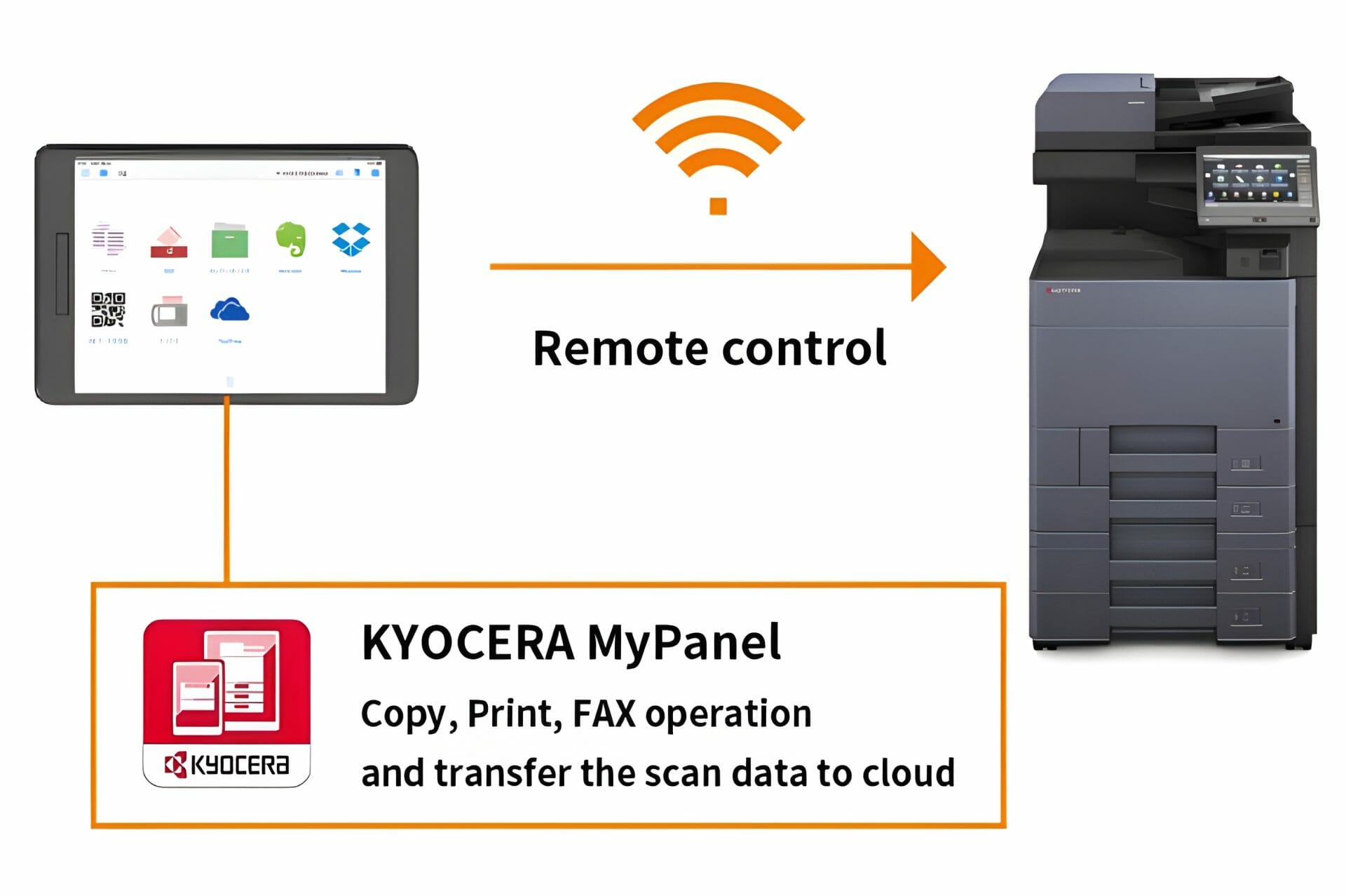
With USB support, this printer seamlessly integrates into your existing setup, allowing for easy printing and scanning directly from your USB devices.

Whether you need to print documents from your USB drive or scan files directly to it, the Taskalfa 3554ci makes it simple and efficient.

Say goodbye to complicated setup processes and hello to streamlined connectivity with the Kyocera Taskalfa 3554ci.

Ready to revolutionise your workflow with the Kyocera Taskalfa 3554ci?

Get an instant printer lease quote today and experience the power of this versatile printer in your office.

Contact Global Document Solutions now to get started!

Enhance Efficiency with Duplex Printing: Save Time and Paper Automatically!

The duplex printing feature, allowing automatic printing on both sides of a page, proves invaluable in home or office environments.

This cost effective capability not only conserves paper and ink but, more importantly, saves precious time.

Gone are the days of manually flipping and reinserting pages for double sided printsโ€”duplex printing takes care of this task seamlessly.

The results?

Cleaner and more professional looking documents compared to their one sided counterparts, now available in seconds or less with the Taskalfa 3554ci series.

If your current printer lacks duplex printing, it might be time to consider the investment in a Kyocera Taskalfa series model for enhanced productivity.

The long term benefits in time and cost savings for you and your business make it a wise choice.

Upgrade your printing experience today!

Enhance Efficiency: Scan One Page at a Time for Time Savings!

Scanning each page individually improves accuracy and speeds up the turnaround time for your scanning tasks.

Processing and organising multiple page scans take longer, and thereโ€™s a risk of overlooking important details when the images are combined.

Save yourself time and ensure accuracy by adopting the practice of scanning each page individually.

This not only improves accuracy but also speeds up the turnaround time for your scanning tasks.

Donโ€™t leave efficiency to chanceโ€”embrace the best practice of scanning one page at a time for optimal results in organising your digital documents!

Optimise Efficiency: Use โ€œN-upโ€ Setting for Space Saving Copies!

For electronic document storage efficiency, the โ€œN-upโ€ setting proves to be a game changer.

This feature allows you to print multiple pages on a single sheet, conserving both paper and computer storage space, a function available through Kyocera Mobile Print.

Embracing the โ€œN-upโ€ setting not only benefits those with limited physical storage but also saves valuable time when urgent document printing is required.

The Kyocera Taskalfa 3554ci, a powerful multifunctional printer, seamlessly incorporates duplex printing, making it perfect for any business seeking to improve productivity.

If you are weighing up leasing one for your office, you can work out your monthly price in 43 seconds with our online quote calculator.

Maximise efficiency in your office by adopting these practices and always achieve the best results.

Optimising Paper Handling: Cassette and Multi Purpose Tray

Revolutionise Your Workflow with the Kyocera Taskalfa 3554ci: Expert Maintenance Tips & Insights Inside!

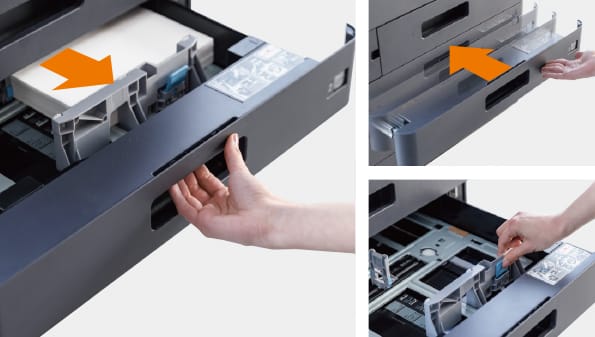
Efficient document management with the Kyocera Taskalfa 3554ci involves mastering the cassette and multipurpose tray.

Cassette

  • Large capacity minimises frequent paper replenishment, ensuring uninterrupted workflow.
  • Ideal for high volume tasks, offering flexibility with multiple cassettes for various paper sizes.

Multi Purpose Tray

  • Accommodates diverse paper sizes, including A3, A6R, SRA3, and custom sizes.
  • Perfect for special printing tasks, eliminating the need to change paper in the cassette for single sheet printing.

Contact Global Document Solutionsย for valuable maintenance tips and expert advice on optimising Kyocera Taskalfa 3554ciโ€™s capabilities.

Explore our range of office multifunction printers, including the versatile Taskalfa 3554ci, which offers comprehensive document management solutions for printing, scanning, and secure data storage.

Experience seamless document management tailored to your business needs.

Revolutionise Your Workflow with the Kyocera Taskalfa 3554ci: Expert Maintenance Tips & Insights Inside!
Anthony Torrens
4 weeks ago
I would like to express my thanks for the excellent service I received from the service technician who resolved my jammed printer. His persistence and expertise resulted in the discovery of a tiny piece of torn paper that eluded discovery for nearly 30mins. This caused the printer to constantly trigger a jam error. The cost of the service was well worth the result. Many thanks, Anthony Torrens.
Response from the owner:Hi Anthony, Thank you so much for taking the time to leave such a thoughtful review. We're delighted to hear that our technician was able to track down the tiny piece of paper causing the jam. Sometimes it's the smallest things that create the biggest headaches, and we're pleased their persistence and attention to detail got your printer back up and running. We really appreciate your kind words and your support of our business. If we can ever assist you again, please don't hesitate to get in touch.
Revolutionise Your Workflow with the Kyocera Taskalfa 3554ci: Expert Maintenance Tips & Insights Inside!
Sara Taylor
2 months ago
We replaced our existing machine (also through GDS) and, as always, the process was seamless. We had our machine up and running with minimal downtime. Thanks Cyrus and team.
Response from the owner:Thanks for the stellar review, Sara.
Revolutionise Your Workflow with the Kyocera Taskalfa 3554ci: Expert Maintenance Tips & Insights Inside!
Goksel Doganay
2 months ago
Absolutely blown away with the service! Thank you Cyrus.
Response from the owner:Thanks so much for taking time out of your day to leave us a review.
Revolutionise Your Workflow with the Kyocera Taskalfa 3554ci: Expert Maintenance Tips & Insights Inside!
Mark Wright
3 months ago
Fantastic experience: the team is easy to deal with, with very fast response times and super fast delivery. As a business owner, I am always looking to save cost and time, and they did exactly that for our business.
Response from the owner:Thanks, Mark! We're delighted to hear you're happy with your new office printer solution. Our goal is always to provide fast service, reliable equipment and great value, so it's wonderful to hear we delivered on that promise. Regards Cyrus & The Team
Revolutionise Your Workflow with the Kyocera Taskalfa 3554ci: Expert Maintenance Tips & Insights Inside!
Quick Tax
4 months ago
Great experience with Global Document Solutions. The team was responsive easy to deal with, and the whole process was smooth from start to finish. Highly recommend!
Response from the owner:Thank you so much for the kind words โ€” we really appreciate it! Iโ€™m glad to hear the process felt smooth from start to finish and that the team was easy to deal with. Thatโ€™s exactly the experience we aim to deliver. Thanks again for your support and recommendation โ€” it means a lot to us. Kind regards, Cyrus & the Global Document Solutions team
Revolutionise Your Workflow with the Kyocera Taskalfa 3554ci: Expert Maintenance Tips & Insights Inside!
Alana McDermaid
4 months ago
Weโ€™ve had a great experience with this team. Theyโ€™re always prompt, helpful and really easy to deal with. Any issues are sorted quickly and the whole printer leasing process has been seamless. Highly recommend.
Response from the owner:Thank you so much for your kind words Alana โ€” we really appreciate it! Iโ€™m glad to hear everything has been running smoothly and that the team has been prompt and easy to deal with. We always aim to make the whole process as seamless as possible and resolve any issues quickly. Thanks again for your support and recommendation โ€” it means a lot to us. Kind regards, Cyrus & the Global Document Solutions team
Revolutionise Your Workflow with the Kyocera Taskalfa 3554ci: Expert Maintenance Tips & Insights Inside!
Eve Clout
4 months ago
Very happy with our printer and the setup of it. Excellent customer service.
Response from the owner:Thank you for the great feedback Eve โ€” we really appreciate it! Iโ€™m glad to hear youโ€™re happy with the printer and the setup, and that the experience has been smooth. Providing excellent service is what we strive for, so itโ€™s great to hear that reflected. Thanks again for your support, and please donโ€™t hesitate to reach out if you need anything. Kind regards, Cyrus & the Global Document Solutions team
Revolutionise Your Workflow with the Kyocera Taskalfa 3554ci: Expert Maintenance Tips & Insights Inside!
Lisa Israel
4 months ago
It was a great experience. I t was a seemless setup and removal of previous machine. I would recommend Global Document for all your printing requirements.
Response from the owner:Thank you for the fantastic feedback Lisa โ€” we really appreciate it! Iโ€™m glad to hear the setup and removal process was seamless and everything went smoothly from start to finish. Thatโ€™s exactly the experience we aim to deliver. Thanks again for your recommendation and support โ€” it means a lot to us. Kind regards, Cyrus & the Global Document Solutions team
Revolutionise Your Workflow with the Kyocera Taskalfa 3554ci: Expert Maintenance Tips & Insights Inside!
Max Sharma
5 months ago
โ€‹Great experience with Global Document Solutions. The new printer is a fantastic addition to our office, and Cyrus did an incredible job handling everything. His attention to detail and "can-do" attitude made a real difference. Highly recommended!
Response from the owner:Thank you so much for your kind words Max โ€” we really appreciate it! Iโ€™m glad to hear the new printer has been a great addition to your office and that the process ran smoothly. It was a pleasure working with you, and Iโ€™m always happy to help wherever I can. Thanks again for your support and recommendation โ€” it means a lot to us. Kind regards, Cyrus & the Global Document Solutions team

FAQs: Unveiling Kyocera 3554ci Maintenance Tips Insights

Get your set monthly price

Tell us your monthly page count and we send back one written figure, from $160 a month ex GST.

Toner, parts, servicing and call outs all sit inside it.

The only thing you ever buy on top is paper.

    We only use your details to prepare and follow up your quote. They are never sold or shared for marketing. Read our privacy policy.

    Obligation free quote

    No lock in contracts

    $0 upfront, one all inclusive monthly payment

    5.0 on Google

    Leasing printers to Australian businesses since 2010

    Q: What is the maximum dpi resolution of the Kyocera 3554ci scanner?

    A: The Kyocera 3554ci scanner has an adjustable 200-600 dpi resolution, providing high quality and detailed scans.

    Q: What is the paper tray capacity of the Kyocera 3554ci printer?

    A: The Kyocera 3554ci printer has a paper tray capacity of up to 7,150 sheets, allowing for continuous printing without frequent paper replacement.

    We can add the additional paper capacity as your business requires.

    Q: What does the term โ€œfaxโ€ mean?

    A: The term โ€œfaxโ€ refers to a device that is used to transmit scanned images or documents over a telephone line to another fax machine or computer.

    Q: What does the term โ€œoptionalโ€ mean in the context of the Kyocera 3554ci?

    A: In the context of the Kyocera 3554ci, โ€œoptionalโ€ refers to features or accessories that are not included as standard with the copier, but can be added or purchased separately.

    Q: Is the Kyocera Taskalfa 2554ci compatible with Mac OS X?

    A: Yes, the Kyocera Taskalfa 2554ci is compatible with Mac OS X.

    You can easily connect and use the printer with your Mac computer.

    Q: How does the Kyocera 3554ci handle paper?

    A: The Kyocera taskalfa 3554ci has intuitive paper handling features that allow for easy configuration and adjustment of paper trays and settings.

    It also includes features such as automatic paper jam detection and removal, and the ability to scan directly to a USB device.

    Q: What should I do if there is a paper jam in the Kyocera 3554ci?

    A: If you experience a paper jam in the Kyocera 3554ci mfp, you should refer to the user manual for specific instructions on how to locate and remove the jammed paper.

    If you are unable to resolve the issue, you may need to contact a Kyocera technician for assistance.

    Q: How many pages per minute can the Kyocera 3554ci print?

    A: The Kyocera 3554ci colour copier can print up to 35 pages per minute in both colour and black and white.

    Q: What is the Kyocera Document Solutions?

    A: Theย Kyocera Document Solutions is a subsidiary of Kyocera Corporation that specialises in providing document management solutions, including copiers, printers, and software.

    Q: How can I enhance data security and protect my assets with the Kyocera 3554ci?

    A: The Kyocera 3554ci offers various security features, such as user authentication and data encryption, to enhance data security and protect your assets.

    You can also configure additional security settings and protocols to meet your specific requirements.

    Ready to unlock the full potential of your Kyocera Taskalfa 3554ci?

    Contact Global Document Solutions now for tailored advice and maintenance tips!

    Conclusion

    The Kyocera Taskalfa 3554ci is a multifunctional powerhouse designed to meet all your printing, scanning, and copying requirements with ease and efficiency.

    This article has provided expert tips and insights to help you make the most of your Kyocera Taskalfa 3554ci, ensuring optimal performance and productivity.

    For broader servicing advice that applies across the full Kyocera range, see our general Kyocera maintenance practices guide.

    For personalised assistance and to experience seamless document management, donโ€™t hesitate to contact Global Document Solutions today.

    Take the first step towards maximising your deviceโ€™s potential by reaching out to Global Document Solutions and benefitting from our knowledge and experience.

    Contact us now for tailored solutions to your document management needs.

    Ready for your own number?

    Tell us your monthly page count and we send back one written figure, from $160 a month ex GST.

    Toner, parts, servicing and call outs all sit inside it.

    The only thing you ever buy on top is paper.

      We only use your details to prepare and follow up your quote. They are never sold or shared for marketing. Read our privacy policy.

      Obligation free quote

      No lock in contracts

      $0 upfront, one all inclusive monthly payment

      5.0 on Google

      Leasing printers to Australian businesses since 2010

      Revolutionise Your Workflow with the Kyocera Taskalfa 3554ci: Expert Maintenance Tips & Insights Inside!

      Author : Cyrus Dickie

      With over 15 years of experience under his belt, Cyrus Dickie is a true master in the world of printer leasing.

      He specialises in providing customised printing solutions to businesses.

      His operational excellence and steadfast customer service have set groundbreaking industry benchmarks.

      As the visionary leader at Global Document Solutions, Cyrus continues to elevate the standards of customer satisfaction and operational efficiency.

      15 Years of Continuous Service to my business without any issues. Cyrus is a legend!

      Marvin Reck

      Found Cyrus and his team to be very professional, prompt and cost effective. Best in the business. Highly recommended.

      Matthew Dean

      Have been using GDS for the supply and maintenance of our office printers for over 5 years now. Customer service level is consistently high, with an excellent reaction and response rate.

      Marina Denaro

      Why Work with Us?

      With a fully trained and skilled team of experts, our company provides only the best qualities for our clients.

      Besides offering high-end equipment, we also deliver exceptional service in smart financing on software and hardware, remote management and account management.

      Contact Global Document Solutions to get the perfect combination of efficiency and innovation in document printing.

      To buy a Kyocera printer, consult with our friendly agents today.

      Revolutionise Your Workflow with the Kyocera Taskalfa 3554ci: Expert Maintenance Tips & Insights Inside!
      Anthony Torrens
      4 weeks ago
      I would like to express my thanks for the excellent service I received from the service technician who resolved my jammed printer. His persistence and expertise resulted in the discovery of a tiny piece of torn paper that eluded discovery for nearly 30mins. This caused the printer to constantly trigger a jam error. The cost of the service was well worth the result. Many thanks, Anthony Torrens.
      Response from the owner:Hi Anthony, Thank you so much for taking the time to leave such a thoughtful review. We're delighted to hear that our technician was able to track down the tiny piece of paper causing the jam. Sometimes it's the smallest things that create the biggest headaches, and we're pleased their persistence and attention to detail got your printer back up and running. We really appreciate your kind words and your support of our business. If we can ever assist you again, please don't hesitate to get in touch.
      Revolutionise Your Workflow with the Kyocera Taskalfa 3554ci: Expert Maintenance Tips & Insights Inside!
      Sara Taylor
      2 months ago
      We replaced our existing machine (also through GDS) and, as always, the process was seamless. We had our machine up and running with minimal downtime. Thanks Cyrus and team.
      Response from the owner:Thanks for the stellar review, Sara.
      Revolutionise Your Workflow with the Kyocera Taskalfa 3554ci: Expert Maintenance Tips & Insights Inside!
      Goksel Doganay
      2 months ago
      Absolutely blown away with the service! Thank you Cyrus.
      Response from the owner:Thanks so much for taking time out of your day to leave us a review.
      Revolutionise Your Workflow with the Kyocera Taskalfa 3554ci: Expert Maintenance Tips & Insights Inside!
      Mark Wright
      3 months ago
      Fantastic experience: the team is easy to deal with, with very fast response times and super fast delivery. As a business owner, I am always looking to save cost and time, and they did exactly that for our business.
      Response from the owner:Thanks, Mark! We're delighted to hear you're happy with your new office printer solution. Our goal is always to provide fast service, reliable equipment and great value, so it's wonderful to hear we delivered on that promise. Regards Cyrus & The Team
      Revolutionise Your Workflow with the Kyocera Taskalfa 3554ci: Expert Maintenance Tips & Insights Inside!
      Quick Tax
      4 months ago
      Great experience with Global Document Solutions. The team was responsive easy to deal with, and the whole process was smooth from start to finish. Highly recommend!
      Response from the owner:Thank you so much for the kind words โ€” we really appreciate it! Iโ€™m glad to hear the process felt smooth from start to finish and that the team was easy to deal with. Thatโ€™s exactly the experience we aim to deliver. Thanks again for your support and recommendation โ€” it means a lot to us. Kind regards, Cyrus & the Global Document Solutions team
      Revolutionise Your Workflow with the Kyocera Taskalfa 3554ci: Expert Maintenance Tips & Insights Inside!
      Alana McDermaid
      4 months ago
      Weโ€™ve had a great experience with this team. Theyโ€™re always prompt, helpful and really easy to deal with. Any issues are sorted quickly and the whole printer leasing process has been seamless. Highly recommend.
      Response from the owner:Thank you so much for your kind words Alana โ€” we really appreciate it! Iโ€™m glad to hear everything has been running smoothly and that the team has been prompt and easy to deal with. We always aim to make the whole process as seamless as possible and resolve any issues quickly. Thanks again for your support and recommendation โ€” it means a lot to us. Kind regards, Cyrus & the Global Document Solutions team
      Revolutionise Your Workflow with the Kyocera Taskalfa 3554ci: Expert Maintenance Tips & Insights Inside!
      Eve Clout
      4 months ago
      Very happy with our printer and the setup of it. Excellent customer service.
      Response from the owner:Thank you for the great feedback Eve โ€” we really appreciate it! Iโ€™m glad to hear youโ€™re happy with the printer and the setup, and that the experience has been smooth. Providing excellent service is what we strive for, so itโ€™s great to hear that reflected. Thanks again for your support, and please donโ€™t hesitate to reach out if you need anything. Kind regards, Cyrus & the Global Document Solutions team
      Revolutionise Your Workflow with the Kyocera Taskalfa 3554ci: Expert Maintenance Tips & Insights Inside!
      Lisa Israel
      4 months ago
      It was a great experience. I t was a seemless setup and removal of previous machine. I would recommend Global Document for all your printing requirements.
      Response from the owner:Thank you for the fantastic feedback Lisa โ€” we really appreciate it! Iโ€™m glad to hear the setup and removal process was seamless and everything went smoothly from start to finish. Thatโ€™s exactly the experience we aim to deliver. Thanks again for your recommendation and support โ€” it means a lot to us. Kind regards, Cyrus & the Global Document Solutions team
      Revolutionise Your Workflow with the Kyocera Taskalfa 3554ci: Expert Maintenance Tips & Insights Inside!
      Max Sharma
      5 months ago
      โ€‹Great experience with Global Document Solutions. The new printer is a fantastic addition to our office, and Cyrus did an incredible job handling everything. His attention to detail and "can-do" attitude made a real difference. Highly recommended!
      Response from the owner:Thank you so much for your kind words Max โ€” we really appreciate it! Iโ€™m glad to hear the new printer has been a great addition to your office and that the process ran smoothly. It was a pleasure working with you, and Iโ€™m always happy to help wherever I can. Thanks again for your support and recommendation โ€” it means a lot to us. Kind regards, Cyrus & the Global Document Solutions team