Kyocera Taskalfa 2554ci Secure Printing: Unlocking Advanced Security

Video Testimonials
Kyocera Taskalfa 2554ci Secure Printing: Unlocking Advanced Security

In the ever changing landscape of document security, the Kyocera 2554ci stands out as a beacon of innovation.

This multifunction printer not only safeguards sensitive information but also enhances productivity, setting a new standard in secure printing.

Let’s delve into the advanced features that makes the Kyocera 2554ci secure printing’s a game changer.

Get your instant printer lease quote!

Security Features: Fortifying Your Confidentiality

The Kyocera 2554ci prioritises document security with robust features, emphasising user authentication and data protection.

Enhance your office’s document protection with the Kyocera Taskalfa 2554ci, equipped with advanced security features designed to fortify copier security and safeguard your sensitive information.

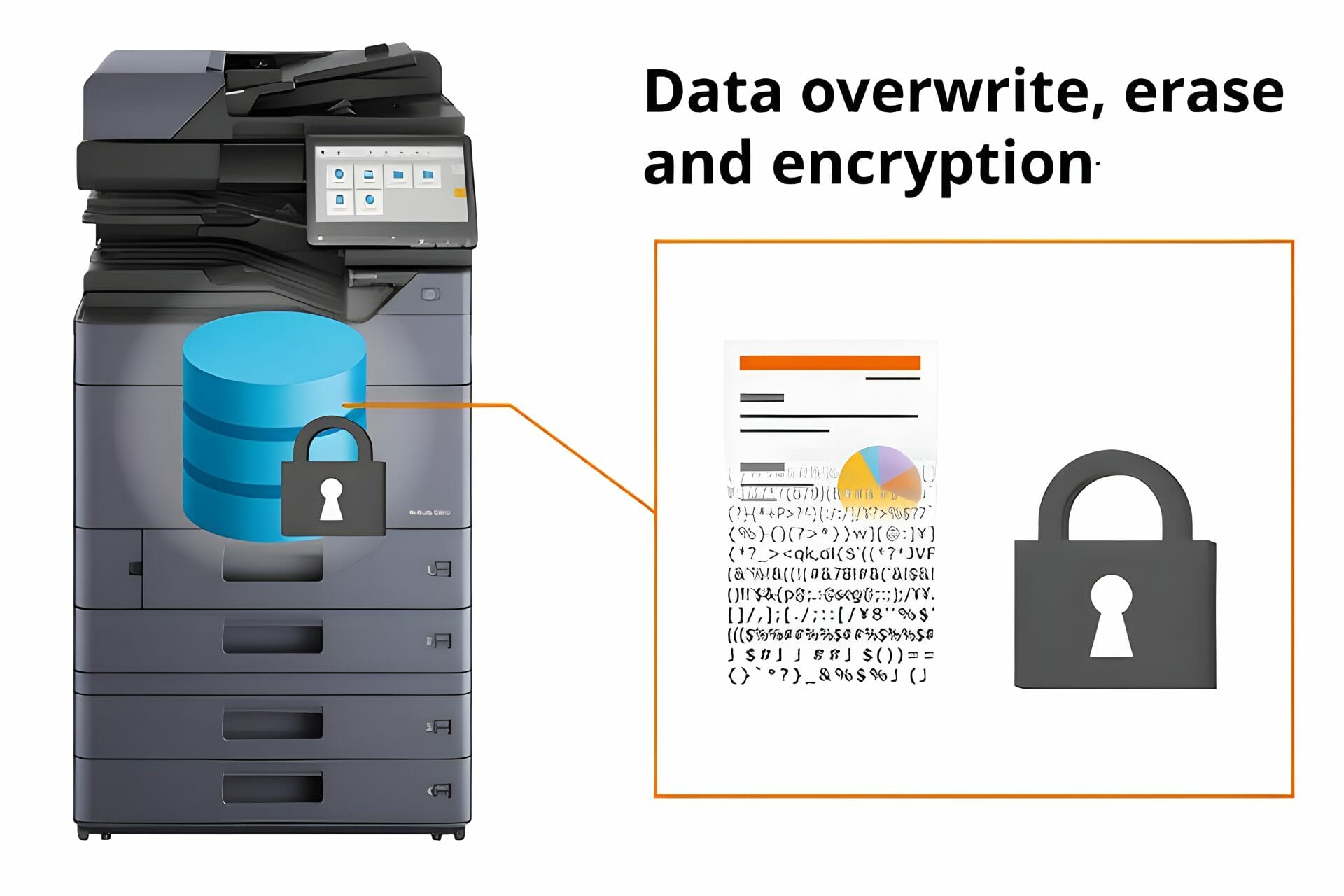
The powerful overwrite protection feature ensures the eradication of sensitive information after each print job, providing unparalleled document protection.

Secure your data today explore the Kyocera 2554ci for unparalleled document protection.

Kyocera Taskalfa 2554ci Secure Printing: Unlocking Advanced Security

Best Practices for Secure Printing: Your Shield Against Exposure

Go beyond printing with Kyocera’s Taskalfa 2554ci by implementing best practices.

Enhance document security and boost productivity with Kyocera’s recommended practices for the 2554ci.

Assign unique credentials to users, update passwords regularly, and shield your business from potential exposure.

Secure your peace of mind along with your documents.

Take control of your document security – implement Kyocera Taskalfa 2554ci best practices now.

Australia: 0414 641 504
Kyocera Taskalfa 2554ci Secure Printing: Unlocking Advanced Security
Anthony Torrens
4 weeks ago
I would like to express my thanks for the excellent service I received from the service technician who resolved my jammed printer. His persistence and expertise resulted in the discovery of a tiny piece of torn paper that eluded discovery for nearly 30mins. This caused the printer to constantly trigger a jam error. The cost of the service was well worth the result. Many thanks, Anthony Torrens.
Response from the owner:Hi Anthony, Thank you so much for taking the time to leave such a thoughtful review. We're delighted to hear that our technician was able to track down the tiny piece of paper causing the jam. Sometimes it's the smallest things that create the biggest headaches, and we're pleased their persistence and attention to detail got your printer back up and running. We really appreciate your kind words and your support of our business. If we can ever assist you again, please don't hesitate to get in touch.
Kyocera Taskalfa 2554ci Secure Printing: Unlocking Advanced Security
Sara Taylor
2 months ago
We replaced our existing machine (also through GDS) and, as always, the process was seamless. We had our machine up and running with minimal downtime. Thanks Cyrus and team.
Response from the owner:Thanks for the stellar review, Sara.
Kyocera Taskalfa 2554ci Secure Printing: Unlocking Advanced Security
Goksel Doganay
2 months ago
Absolutely blown away with the service! Thank you Cyrus.
Response from the owner:Thanks so much for taking time out of your day to leave us a review.
Kyocera Taskalfa 2554ci Secure Printing: Unlocking Advanced Security
Mark Wright
3 months ago
Fantastic experience: the team is easy to deal with, with very fast response times and super fast delivery. As a business owner, I am always looking to save cost and time, and they did exactly that for our business.
Response from the owner:Thanks, Mark! We're delighted to hear you're happy with your new office printer solution. Our goal is always to provide fast service, reliable equipment and great value, so it's wonderful to hear we delivered on that promise. Regards Cyrus & The Team
Kyocera Taskalfa 2554ci Secure Printing: Unlocking Advanced Security
Quick Tax
4 months ago
Great experience with Global Document Solutions. The team was responsive easy to deal with, and the whole process was smooth from start to finish. Highly recommend!
Response from the owner:Thank you so much for the kind words — we really appreciate it! I’m glad to hear the process felt smooth from start to finish and that the team was easy to deal with. That’s exactly the experience we aim to deliver. Thanks again for your support and recommendation — it means a lot to us. Kind regards, Cyrus & the Global Document Solutions team
Kyocera Taskalfa 2554ci Secure Printing: Unlocking Advanced Security
Alana McDermaid
4 months ago
We’ve had a great experience with this team. They’re always prompt, helpful and really easy to deal with. Any issues are sorted quickly and the whole printer leasing process has been seamless. Highly recommend.
Response from the owner:Thank you so much for your kind words Alana — we really appreciate it! I’m glad to hear everything has been running smoothly and that the team has been prompt and easy to deal with. We always aim to make the whole process as seamless as possible and resolve any issues quickly. Thanks again for your support and recommendation — it means a lot to us. Kind regards, Cyrus & the Global Document Solutions team
Kyocera Taskalfa 2554ci Secure Printing: Unlocking Advanced Security
Eve Clout
4 months ago
Very happy with our printer and the setup of it. Excellent customer service.
Response from the owner:Thank you for the great feedback Eve — we really appreciate it! I’m glad to hear you’re happy with the printer and the setup, and that the experience has been smooth. Providing excellent service is what we strive for, so it’s great to hear that reflected. Thanks again for your support, and please don’t hesitate to reach out if you need anything. Kind regards, Cyrus & the Global Document Solutions team
Kyocera Taskalfa 2554ci Secure Printing: Unlocking Advanced Security
Lisa Israel
4 months ago
It was a great experience. I t was a seemless setup and removal of previous machine. I would recommend Global Document for all your printing requirements.
Response from the owner:Thank you for the fantastic feedback Lisa — we really appreciate it! I’m glad to hear the setup and removal process was seamless and everything went smoothly from start to finish. That’s exactly the experience we aim to deliver. Thanks again for your recommendation and support — it means a lot to us. Kind regards, Cyrus & the Global Document Solutions team
Kyocera Taskalfa 2554ci Secure Printing: Unlocking Advanced Security
Max Sharma
5 months ago
​Great experience with Global Document Solutions. The new printer is a fantastic addition to our office, and Cyrus did an incredible job handling everything. His attention to detail and "can-do" attitude made a real difference. Highly recommended!
Response from the owner:Thank you so much for your kind words Max — we really appreciate it! I’m glad to hear the new printer has been a great addition to your office and that the process ran smoothly. It was a pleasure working with you, and I’m always happy to help wherever I can. Thanks again for your support and recommendation — it means a lot to us. Kind regards, Cyrus & the Global Document Solutions team

Benefits Beyond Security: The Kyocera Taskalfa 2554ci Printer

Kyocera Taskalfa 2554ci Secure Printing: Unlocking Advanced Security

Equip your business with Kyocera 2554ci efficiency:

  • Easy to Use: User friendly design for quick printing initiation.
  • High Quality Output: Prints at 25ppm with adjustable resolution settings.
  • Durability & Low Maintenance: Longevity and low maintenance costs for a worry free future.
  • Environmentally Friendly: Auto Power On/Off and Eco Mode showcase commitment to sustainability.

Experience the reliability of the Kyocera Taskalfa 2554ci – a secure printing solution that prioritizes comprehensive document security and advanced productivity features.

Unlock advanced document management capabilities with Kyocera’s secure printing solutions, featuring robust security measures and customizable workflows tailored to your business needs.

Request a demo now and discover how Kyocera’s eco-friendly printing solutions enhance office efficiency and sustainability with their innovative printers.

Taking Advantage of Advanced Features: Redefining Printing Productivity

Kyocera Taskalfa 2554ci Secure Printing: Unlocking Advanced Security

Kyocera 2554ci’s advanced features turbocharge productivity:

  • Mobile Printing: Print from anywhere and scan directly to cloud services.
  • Internet Fax and Network Scanning: Efficient network scanning without traditional fax machines.
  • High Capacity Input Trays: Store up to 500 sheets for seamless handling of special media.
  • Customisable Finishing Options: Professional documents with auto duplexing for cost and time savings.

Get your printer lease quote and boost your productivity today – unlock Kyocera 2554ci’s advanced features now.

Experience enhanced document security with the Kyocera 2554ci’s advanced troubleshooting capabilities for print quality issues.

Want secure print set up for you?

Every machine we lease is configured on site by our own technicians, and help with settings like these sits inside the monthly figure.

Plans start at $160 a month ex GST, with nothing to pay up front and no auto renewal.

Get my set monthly quote →

No obligation.

5.0 on Google from 150+ reviews.

Understanding the “Prompt for Access Code” Feature: Enhancing Security to New Heights

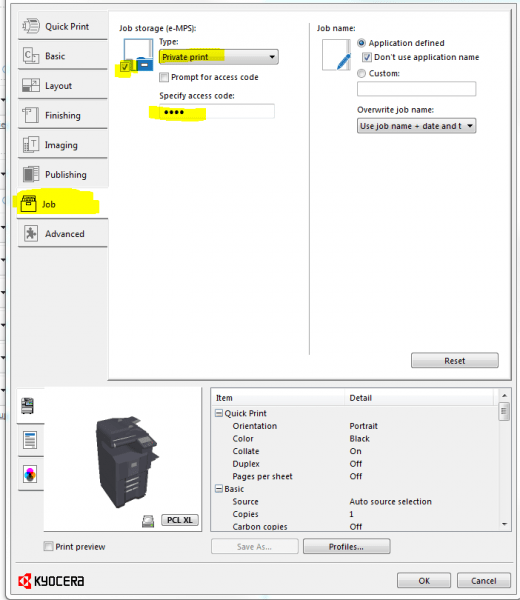
In the realm of secure printing, the “Prompt for Access Code” feature takes center stage on the Kyocera 2554ci.

This feature ensures that only authorised users can release print jobs, preventing unauthorised access and securing sensitive information.

Contact us to activate the game changing ‘Prompt for Access Code’ feature and fortify your document security instantly.

Kyocera Taskalfa 2554ci Secure Printing: Unlocking Advanced Security

FAQ

Q: What is the A4 duplex copy speed of the Kyocera 2554ci?

A: The Kyocera 2554ci offers efficient double sided copying at a fast A4 duplex copy speed.

Q: What is the Kyocera 2554ci?

A: The Kyocera 2554ci is a secure printing solution provided by Kyocera Document Solutions.

Get your set monthly price

Tell us your monthly page count and we send back one written figure, from $160 a month ex GST.

Toner, parts, servicing and call outs all sit inside it.

The only thing you ever buy on top is paper.

    We only use your details to prepare and follow up your quote. They are never sold or shared for marketing. Read our privacy policy.

    Obligation free quote

    No lock in contracts

    $0 upfront, one all inclusive monthly payment

    5.0 on Google

    Leasing printers to Australian businesses since 2010

    Q: How fast can the Kyocera 2554ci scan?

    A: The Kyocera 2554ci scans at speeds up to 12 pages A3 per minute duplex and 25 pages A4 per minute, ensuring efficient document digitisation.

    Q: Can the Kyocera 2554ci handle high resolution images?

    A: Yes, the Kyocera 2554ci efficiently captures high resolution images, supporting resolutions up to 300 dpi.

    Q: Does the Kyocera 2554ci support Linux?

    A: Absolutely, the Kyocera 2554ci is compatible with Linux and seamlessly integrates with various operating systems.

    Q: How many outline fonts does it support?

    A: The Kyocera 2554ci supports 93 outline fonts, offering ample options for creative document design.

    Q: What is Kyocera 2554ci Secure Printing?

    A: Kyocera 2554ci Secure Printing enhances document security through advanced security measures during the printing process.

    Q: What is the Private Print feature?

    A: The Private Print feature requires users to enter a unique access code on the device, ensuring secure document release and printing.

    Q: How does job storage work?

    A: Job storage allows users to securely store print jobs on the printer’s hard drive until it is convenient for printing.

    Q: What is the KX driver?

    A: The KX driver by Kyocera facilitates easy access and control of various printer settings during document printing.

    Q: What are the intelligent features?

    A: Intelligent features include searchable PDF, high compression PDF, and multi feed detection, enhancing document management and productivity.

    Conclusion: Enhance Your Printing Experience with Kyocera

    The Kyocera 2554ci is not just a printer; it’s a secure printing solution that prioritises confidentiality, productivity, and sustainability.

    With advanced features and a commitment to security, this eco friendly printer is an investment in the future of your company.

    Ready to fortify your document security with confidence?

    Contact Global Document Solutions at 0414 641 504 and enhance your printing experience with Kyocera.

    Australia: 0414 641 504

    Related: secure and follow me printing explained.

    Ready for your own number?

    Tell us your monthly page count and we send back one written figure, from $160 a month ex GST.

    Toner, parts, servicing and call outs all sit inside it.

    The only thing you ever buy on top is paper.

      We only use your details to prepare and follow up your quote. They are never sold or shared for marketing. Read our privacy policy.

      Obligation free quote

      No lock in contracts

      $0 upfront, one all inclusive monthly payment

      5.0 on Google

      Leasing printers to Australian businesses since 2010

      Kyocera Taskalfa 2554ci Secure Printing: Unlocking Advanced Security

      Author : Cyrus Dickie

      With over 15 years of experience under his belt, Cyrus Dickie is a true master in the world of printer leasing.

      He specialises in providing customised printing solutions to businesses.

      His operational excellence and steadfast customer service have set groundbreaking industry benchmarks.

      As the visionary leader at Global Document Solutions, Cyrus continues to elevate the standards of customer satisfaction and operational efficiency.

      15 Years of Continuous Service to my business without any issues. Cyrus is a legend!

      Marvin Reck

      Found Cyrus and his team to be very professional, prompt and cost effective. Best in the business. Highly recommended.

      Matthew Dean

      Have been using GDS for the supply and maintenance of our office printers for over 5 years now. Customer service level is consistently high, with an excellent reaction and response rate.

      Marina Denaro

      Why Work with Us?

      With a fully trained and skilled team of experts, our company provides only the best qualities for our clients.

      Besides offering high-end equipment, we also deliver exceptional service in smart financing on software and hardware, remote management and account management.

      Contact Global Document Solutions to get the perfect combination of efficiency and innovation in document printing.

      To buy a Kyocera printer, consult with our friendly agents today.

      Kyocera Taskalfa 2554ci Secure Printing: Unlocking Advanced Security
      Anthony Torrens
      4 weeks ago
      I would like to express my thanks for the excellent service I received from the service technician who resolved my jammed printer. His persistence and expertise resulted in the discovery of a tiny piece of torn paper that eluded discovery for nearly 30mins. This caused the printer to constantly trigger a jam error. The cost of the service was well worth the result. Many thanks, Anthony Torrens.
      Response from the owner:Hi Anthony, Thank you so much for taking the time to leave such a thoughtful review. We're delighted to hear that our technician was able to track down the tiny piece of paper causing the jam. Sometimes it's the smallest things that create the biggest headaches, and we're pleased their persistence and attention to detail got your printer back up and running. We really appreciate your kind words and your support of our business. If we can ever assist you again, please don't hesitate to get in touch.
      Kyocera Taskalfa 2554ci Secure Printing: Unlocking Advanced Security
      Sara Taylor
      2 months ago
      We replaced our existing machine (also through GDS) and, as always, the process was seamless. We had our machine up and running with minimal downtime. Thanks Cyrus and team.
      Response from the owner:Thanks for the stellar review, Sara.
      Kyocera Taskalfa 2554ci Secure Printing: Unlocking Advanced Security
      Goksel Doganay
      2 months ago
      Absolutely blown away with the service! Thank you Cyrus.
      Response from the owner:Thanks so much for taking time out of your day to leave us a review.
      Kyocera Taskalfa 2554ci Secure Printing: Unlocking Advanced Security
      Mark Wright
      3 months ago
      Fantastic experience: the team is easy to deal with, with very fast response times and super fast delivery. As a business owner, I am always looking to save cost and time, and they did exactly that for our business.
      Response from the owner:Thanks, Mark! We're delighted to hear you're happy with your new office printer solution. Our goal is always to provide fast service, reliable equipment and great value, so it's wonderful to hear we delivered on that promise. Regards Cyrus & The Team
      Kyocera Taskalfa 2554ci Secure Printing: Unlocking Advanced Security
      Quick Tax
      4 months ago
      Great experience with Global Document Solutions. The team was responsive easy to deal with, and the whole process was smooth from start to finish. Highly recommend!
      Response from the owner:Thank you so much for the kind words — we really appreciate it! I’m glad to hear the process felt smooth from start to finish and that the team was easy to deal with. That’s exactly the experience we aim to deliver. Thanks again for your support and recommendation — it means a lot to us. Kind regards, Cyrus & the Global Document Solutions team
      Kyocera Taskalfa 2554ci Secure Printing: Unlocking Advanced Security
      Alana McDermaid
      4 months ago
      We’ve had a great experience with this team. They’re always prompt, helpful and really easy to deal with. Any issues are sorted quickly and the whole printer leasing process has been seamless. Highly recommend.
      Response from the owner:Thank you so much for your kind words Alana — we really appreciate it! I’m glad to hear everything has been running smoothly and that the team has been prompt and easy to deal with. We always aim to make the whole process as seamless as possible and resolve any issues quickly. Thanks again for your support and recommendation — it means a lot to us. Kind regards, Cyrus & the Global Document Solutions team
      Kyocera Taskalfa 2554ci Secure Printing: Unlocking Advanced Security
      Eve Clout
      4 months ago
      Very happy with our printer and the setup of it. Excellent customer service.
      Response from the owner:Thank you for the great feedback Eve — we really appreciate it! I’m glad to hear you’re happy with the printer and the setup, and that the experience has been smooth. Providing excellent service is what we strive for, so it’s great to hear that reflected. Thanks again for your support, and please don’t hesitate to reach out if you need anything. Kind regards, Cyrus & the Global Document Solutions team
      Kyocera Taskalfa 2554ci Secure Printing: Unlocking Advanced Security
      Lisa Israel
      4 months ago
      It was a great experience. I t was a seemless setup and removal of previous machine. I would recommend Global Document for all your printing requirements.
      Response from the owner:Thank you for the fantastic feedback Lisa — we really appreciate it! I’m glad to hear the setup and removal process was seamless and everything went smoothly from start to finish. That’s exactly the experience we aim to deliver. Thanks again for your recommendation and support — it means a lot to us. Kind regards, Cyrus & the Global Document Solutions team
      Kyocera Taskalfa 2554ci Secure Printing: Unlocking Advanced Security
      Max Sharma
      5 months ago
      ​Great experience with Global Document Solutions. The new printer is a fantastic addition to our office, and Cyrus did an incredible job handling everything. His attention to detail and "can-do" attitude made a real difference. Highly recommended!
      Response from the owner:Thank you so much for your kind words Max — we really appreciate it! I’m glad to hear the new printer has been a great addition to your office and that the process ran smoothly. It was a pleasure working with you, and I’m always happy to help wherever I can. Thanks again for your support and recommendation — it means a lot to us. Kind regards, Cyrus & the Global Document Solutions team